| Date | Build | Comment |
|---|---|---|
| 9/16/2012 | 4.0.0.4 | First DAZ Studio 4.5 version |
| 10/26/2011 | 4.0.0.3 | Rebuild of 4.0.0.3 for DAZ Studio 4.0.3.9 |
| 09/16/2011 | 4.0.0.3 | Rebuild of 4.0.0.3 for DAZ Studio 4.0.2.55 |
| 09/02/2011 | 4.0.0.3 | First DAZ Studio 4.0 compatible build. Requires DAZ Studio 4.0.2.35 |
| 01/30/2011 | 3.0.0.2 | Switched loading methods to use DAZ Studio 3.0's standard method for loading all content. This vastly improves compatibility with .dsb files and objects with script loaders. |
| 07/17/2010 | 3.0.0.1 | Finally decided to package and release an official DAZ Studio 3.x build with full installer. The new installer should handle 32-bit and 64-bit machines correctly (find your installation of Studio). This release also adds support for .dsa files. |
| 06/21/2009 | 3.0.0.0 | This is an alpha test build for DAZ Studio 3.0. 32 bit and 64 bit versions are included. It hasn't had a lot of testing and did require a near complete rewrite of the networking code due to changes in the Qt framework. The alpha build doesn't have an installer, you must copy the plugin by hand to your DAZ Studio plugins folder. See the read me included for more details. The older 2.x release is also still available for DAZ Studio 2.x users. |
| 07/13/2008 | 1.0.0.5 | This build is built against DAZ Studio 2.2 SDK and requires 2.2.2.20 or higher. It adds support for handling combination scripts with CR2/PP2 objects (like the subd-dragon) and a progress bar when loading DAZ Studio native content. Note the progress bar won't move but it will appear so you know something is happening. |
| 04/27/2008 | 1.0.0.4 | Build 1.0.0.4 is fully compatible with DAZ Studio 2.1, no new version is necessary |
| 03/04/2008 | 1.0.0.4 | Recompiled for DAZ Studio 2.0 |
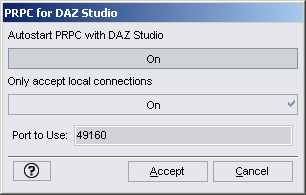
| 01/05/2008 | 1.0.0.3 | Added new option menu with control over auto-start, port, and blocking external connections. Changed menu to Start/Stop. |
| 12/16/2007 | 1.0.0.1 | .daz, .ds and .dsb files weren't being loaded correctly. |
| 12/15/2007 | 1.0.0.0 | Initial Release |
DAZ Studio 4.5
Download for DAZ Studio 4.5 build 4.0.0.4 32-bit and 64-bit
DAZ Studio 4.0.3.9
Download for DAZ Studio 4.0.3.9 build 4.0.0.3 32-bit and 64-bit
Download for DAZ Studio 4.0.2.55 build 4.0.0.3 32-bit and 64-bit
Download for DAZ Studio 4.0.2.35 build 4.0.0.3 32-bit and 64-bit